VoxiGen Studio

A free online voxel editor for models and complete worlds.

Sculpt reusable models, place and group them into freely arranged scenes, light them with real-time ray casting or path tracing, and save or export the world. It all happens in your browser.

Model + Scene workflowsRay Cast + Path TraceVXB models · VXS scenes · VOX interchange · GLB level exportRigged, animated charactersBuild with AIOBJ · STL · GLB · glTF · image import
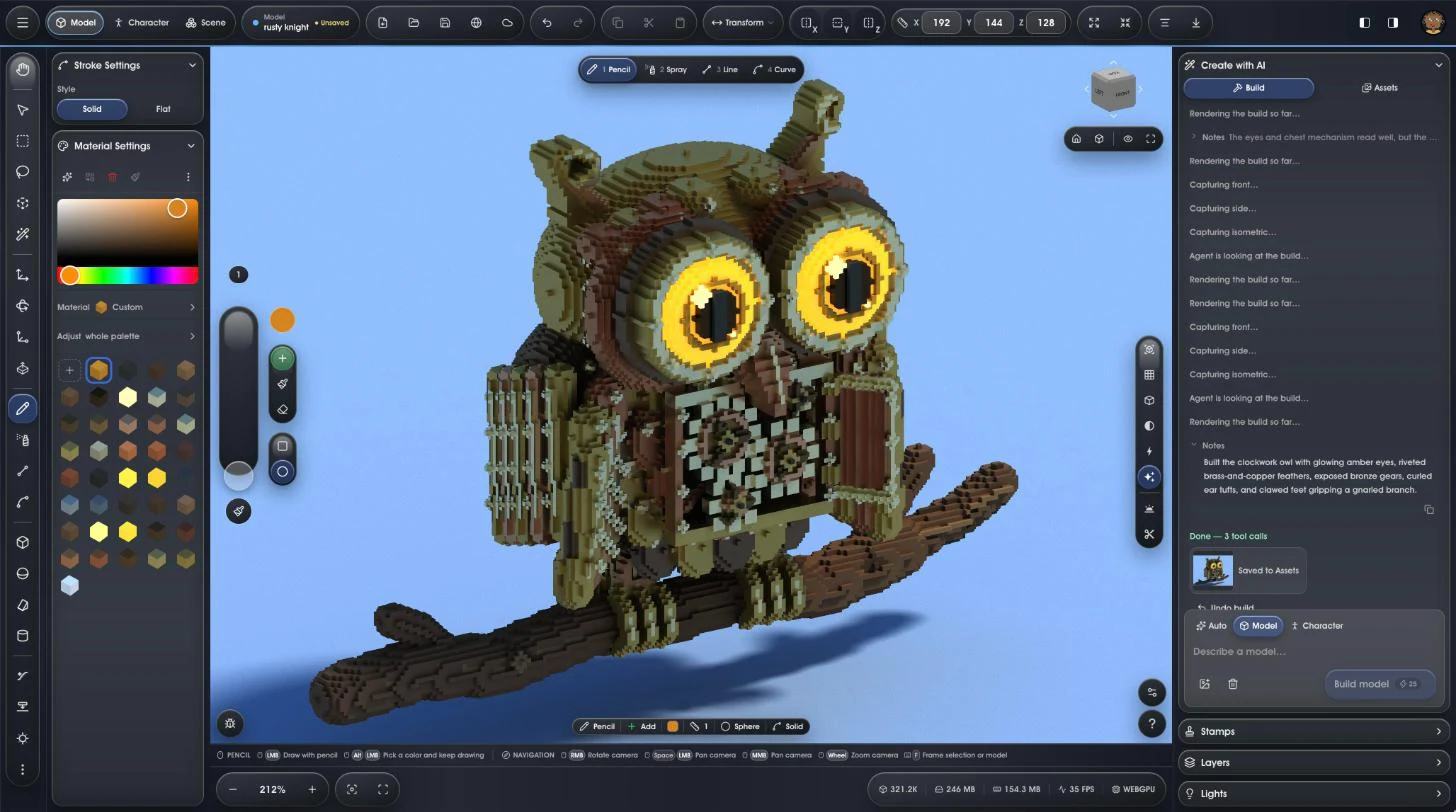
VoxiGen editor in Model mode: a brass clockwork owl with glowing amber eyes on a branch, built by Create with AI
Model to world

Sculpt once. Build whole scenes.

VoxiGen has two connected contexts: create reusable voxel models, then compose them into freely arranged, lit worlds without duplicating their geometry. A third context, Character, rigs models on a skeleton and plays their animations.

01

Create reusable models.

Sculpt, generate, import, layer, and materialize each asset in the Model context. Save it to your library and update every shared placement from one source.

02

Rig and animate it.

Stand a skeleton on any model, or let AI build a rigged character. Play its animations on the canvas, then export an animated GLB for Godot or any glTF engine.

03

Compose a real scene.

Place models freely, then move, rotate, clone, group, hide, name, and organize them in the Outliner. Ray Cast and Path Trace light the assembled world in the same viewport.

04

Save the world or ship the level.

Reopen the complete scene as a native VXS file, or export a game-ready level with one GLB per reused module and a placement manifest.

Everything you need

One editor. Model, compose, render, ship.

Create reusable voxel models and complete scenes, work at billion-voxel scale, generate assets with AI, tune materials, inspect scientific volumes, render final shots, and export to the tools already in your pipeline.

Massive scale

Work at billion-voxel scale.

Every model canvas can address 1024 × 1024 × 1024 voxels. VoxiGen streams active regions as you work, keeping detailed models and large volume datasets practical in the browser.

  • Build detailed voxel models and inspect full-resolution scans.
  • Place models up to 512 voxels per axis in composed scenes.
  • Get the full 1024³ canvas limit on the Free plan.
VoxiGen editor open on a large voxel workspace in the browser
Create with AI

Describe it. Watch it build.

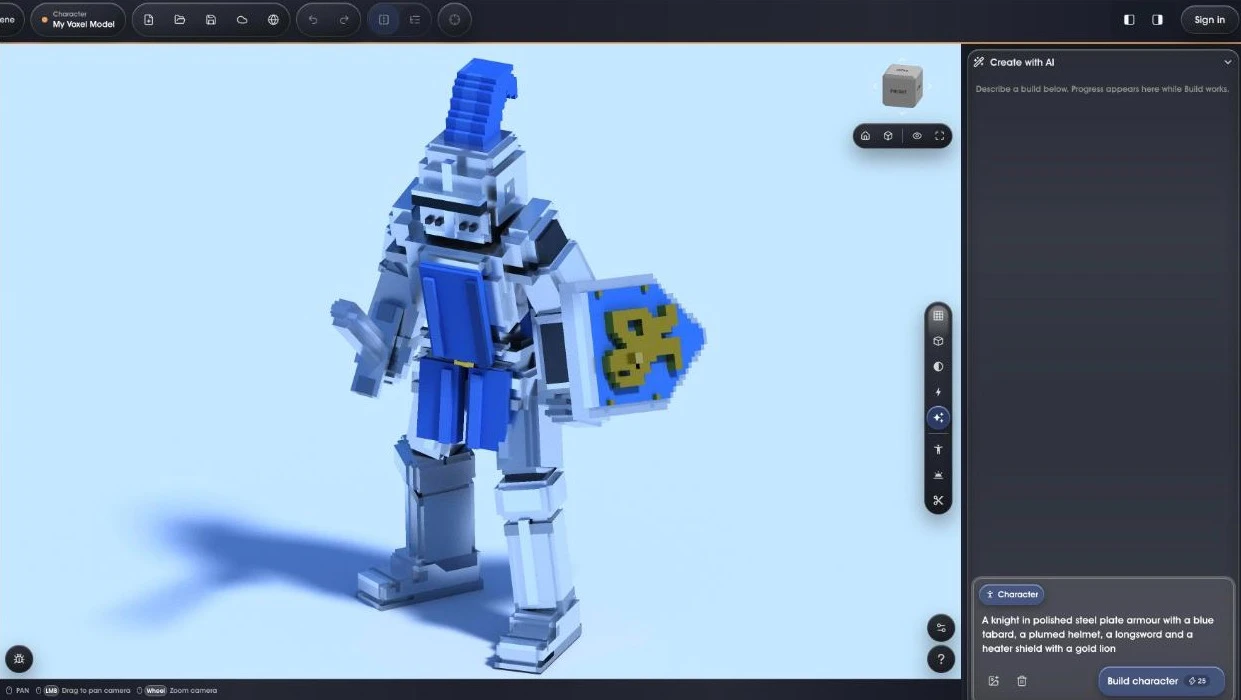
Describe a model or a whole scene in Build and watch editable voxels appear on the canvas. Attach a picture to guide it, or make one in Assets.

  • Models, whole scenes from a kit of reusable pieces, and rigged characters.
  • Build refines its work until it matches your description before it hands over.
  • The result is ordinary voxels in layers: edit, recolour and reuse it like anything made by hand.
A voxel knight made by Build from a one-line description
Characters

Rigged and animated, ready for your game.

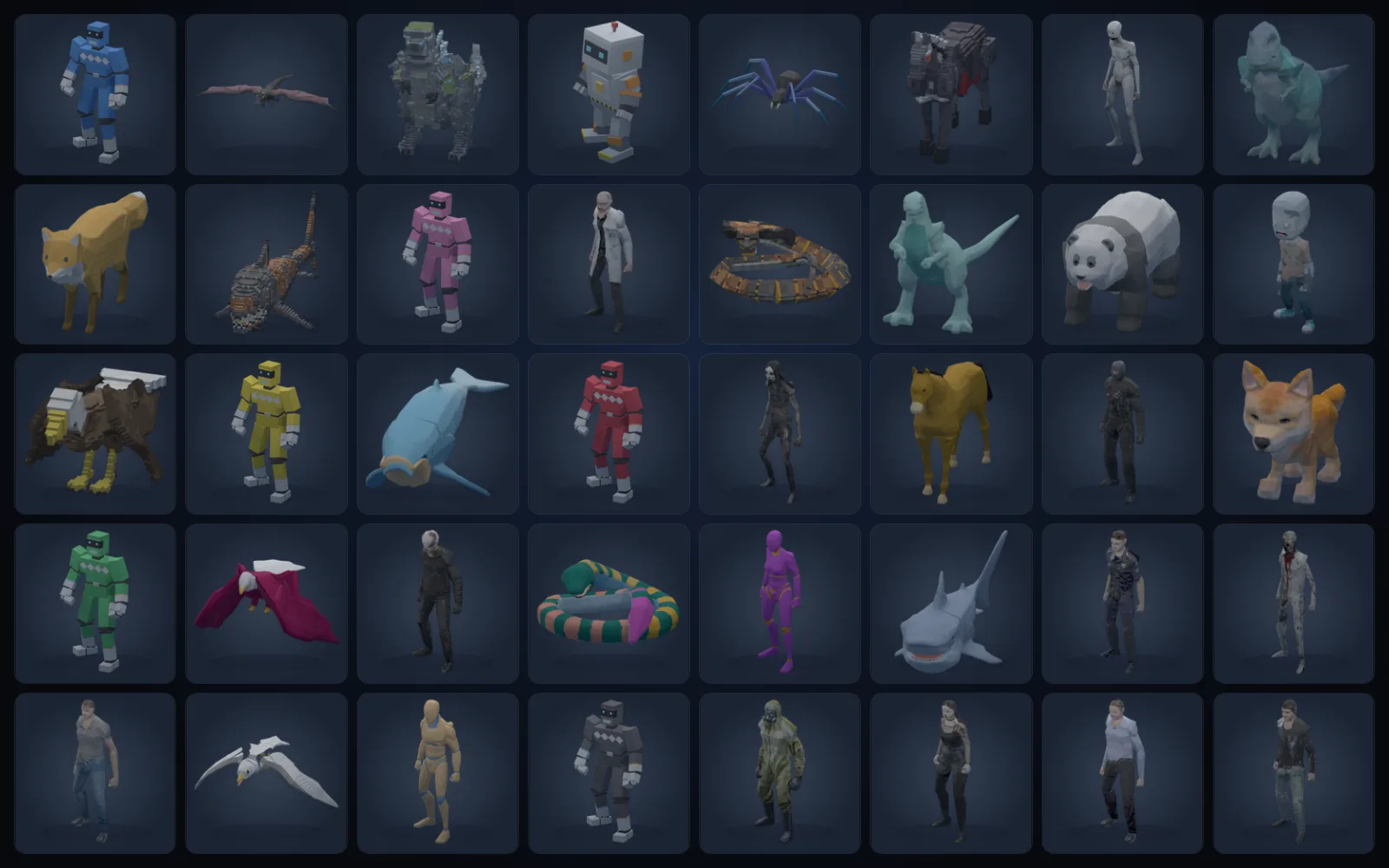
Describe a character and the AI builds it already rigged, open one of 49 ready-made characters, or put a skeleton on your own model. Play its animations on the canvas, then take it into your engine.

  • Nine skeletons: human, fox, bird, horse, dragon, snake, spider, kaiju and shark.
  • An animation library for each skeleton, around 170 clips for the human, or import your own GLB animations.
  • Export an animated GLB with every clip for Godot or any glTF engine.
A grid of rigged voxel characters: people, robots, monsters, a dragon, a T. rex, a horse, a shark and a panda
Scenes & levels

Compose whole game levels from kits.

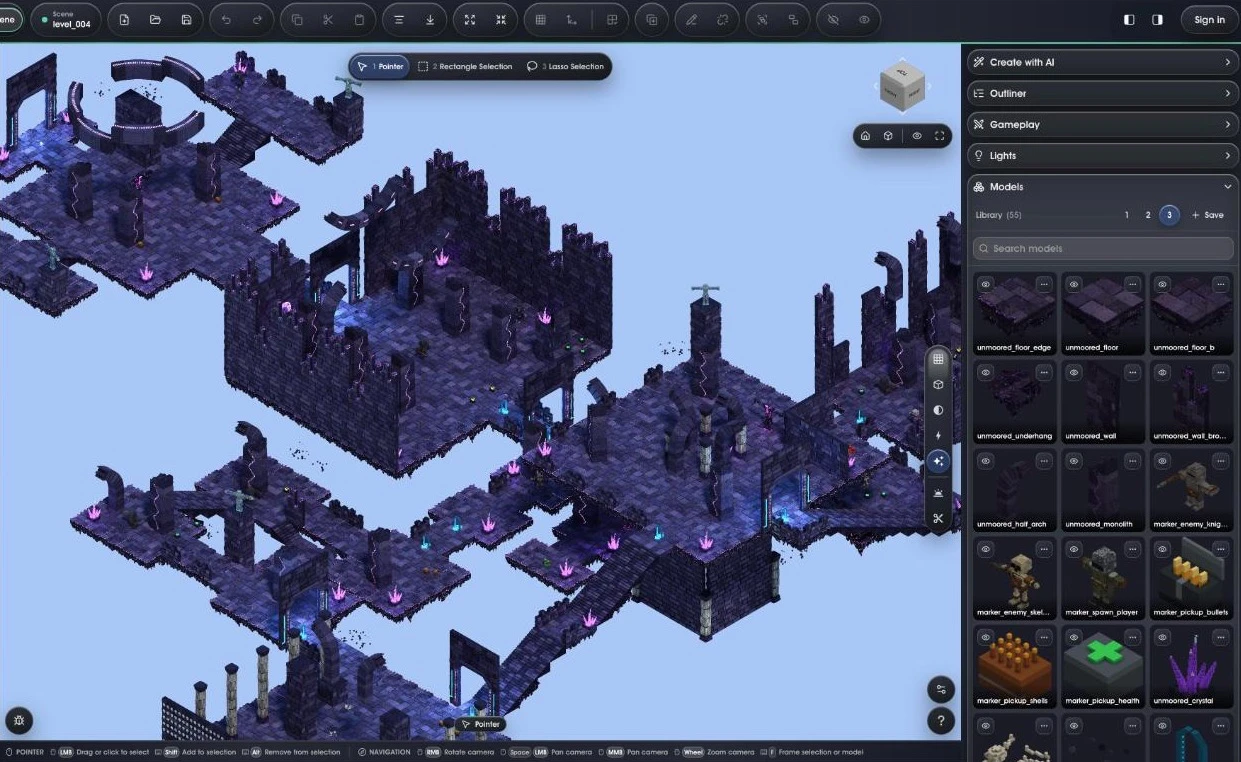
Save pieces as stamps and kits, place them rotated, mirrored or recoloured, and compose them into complete scenes. Edit one shared model and every placement in the level follows.

  • Place, clone, group and name pieces, and organize the level in the Outliner.
  • Save the whole world as one VXS scene, or let Build lay one out from a kit.
  • Export a game-ready level: one GLB per reused piece plus a level.json placement map, ready for Godot.
VOXEN's fourth level, The Unmoored Cathedral, open in VoxiGen's Scene mode with its kit in the Models panel: 14 rooms built from 1,889 placed kit pieces
Live final rendering

Raycast and path tracing while you edit.

Use fast raycast mode for clean live lighting, then switch to path tracing for beauty shots. The important part: the render is still the editor view, so you can adjust voxels, materials, sun and clips while seeing the final look.

  • Save screenshots and render stills directly from the viewport.
  • Raycast view gives a sharp real-time final-look preview for everyday work.
  • Path tracing converges for higher-quality shots when you want polished output.
VoxiGen render controls and post-processing view for final voxel shots
Physical materials

Materials, sun, and density are first-class controls.

Palette slots are full material slots, not just colors. Pick from matte, plastic, metal, chrome, glow, glass, frosted, cloud, and tissue presets, then tune roughness, metalness, emission, IOR, and density against a physical sun.

  • Use roughness, metalness, and emission channels for real surface response.
  • Glass, cloud, and tissue modes add transmission, volume density, and subsurface-style rendering.
  • Sun azimuth, elevation, exposure, fog, ground, and environment controls shape the scene lighting.
VoxiGen material and layer controls for voxel palette slots
Pipeline export

Export to the tools already in your workflow.

Save models as native VXB or VOX, complete worlds as self-contained VXS scenes, or export meshes and levels for game engines, printing, and web delivery, all free.

  • VXB preserves one VoxiGen model; VXS preserves the complete scene and its model library.
  • VOX keeps compatibility with common voxel editors.
  • glTF, GLB, OBJ, and STL cover web, Blender, Maya, game engines, and 3D printing workflows.

Load your levels in Godot →

VoxiGen export dialog showing compatible voxel and mesh export formats
Scientific volume import

Open NRRD data and dissect it live.

Import NRRD scientific volumes such as CT scans, convert tissue bands into editable layers, and inspect them with slice preview, smooth interpolation and live cross-section clip planes.

  • Open raw or gzip .nrrd files directly in the browser.
  • Separate tissue bands into layers so scan data becomes editable voxel structure.
  • Pick bone, soft tissue, fat or lung bands at import; each becomes a layer you can show, hide, recolor or edit.
A ribcage rendered from a CT scan volume in VoxiGen
One voxel engine

Build complete worlds. Explore volumetric data.

The same browser GPU core powers reusable voxel models, composed scenes, AI creation, CT/NRRD inspection, and final rendering. Start with a model, scene, or scan, and keep the entire workflow in one editor.

Create workflow

Build reusable models. Compose complete worlds.

Use AI generation, brushes, layers, symmetry, materials, and live final rendering on canvases up to 1024³, then export into the tools already in your pipeline.

  • Sculpt, generate, import, layer, and materialize reusable models in the project library
  • Place, move, rotate, clone, name, hide, and group models into complete scenes with the Outliner
  • Edit one shared model to update every placement, then light the world with Ray Cast or Path Trace
  • Describe a model, a scene or a character to Build
  • Import OBJ, STL, GLB or glTF models and pictures as editable voxels
  • Rig any model or start from 49 ready-made characters, and play their animations on the canvas
  • Save VXB models and VXS scenes, or export meshes and GLB modules plus level.json, all free
For creators →
Visualize workflow

Open scientific volumes and turn density into structure.

Import NRRD data such as CT scans, split tissue bands into layers, cut them open with live clip planes, then edit or export what you discover.

  • Open raw or gzip NRRD volumes directly in the browser
  • Preview slices at import, then cut the result open with live cross-section clip planes
  • Convert tissue bands and scan regions into editable voxel layers
  • Render or export the result, or share it by link with Cloud
For data →
Pricing

Free to create and export. Pay only for AI.

The whole engine is free, and so is every export: meshes, animated characters and game levels. What you make is yours to use, commercially too. AI runs on prepaid credits, and Cloud is a small subscription for hosted extras: a private library and share links.

Free
$0

  • Model canvases up to 1024³ with the full engine
  • Reusable model library and complete scene composition
  • Ray Cast, Path Trace, materials, layers, and editing tools
  • VXB models, VXS scenes, and VOX import/export
  • Export GLB, glTF, OBJ, STL, animated characters and game levels
  • Full-resolution CT/NRRD inspection and rendering
  • Import OBJ, STL, GLB and glTF models and images
  • Commercial use of your own creations
Start creating

No account needed to start.

Pay as you go
AI credits
$5 and up

  • Everything in Free
  • Build models, scenes and rigged characters from a description
  • Edit what is open with AI, priced by real use
  • Credits never expire; no subscription
Get AI credits

Prepaid packs. A failed build is refunded.

Cloud
$4.99 / mo

  • Private cloud library across devices
  • Private view-only share links
  • Up to 100 private models
  • Or $39.99 a year
Get Cloud

Optional. Cancel anytime.

AI creation works on every plan through prepaid credits that never expire.

Creators shaping VoxiGen

Meet the artists and builders sharing models, ideas, and techniques with the community.

Questions about the voxel editor

Is VoxiGen a free voxel editor?

Yes. The editor, the full 1024³ canvas, scenes, saving as .vox or .vxb, and mesh and level export for game engines are all free, and you can use what you make commercially. Importing OBJ, STL, GLB and glTF models and images is free too. Only AI creation uses prepaid credits.

Do I need to download anything or sign up?

No. VoxiGen runs in a desktop browser with WebGPU, so there is nothing to install, and the editor needs no account. Sign in when you want to keep work in your library, publish it or use AI.

Can it open MagicaVoxel .vox files?

Yes. Open or merge .vox files and save back to .vox, so VoxiGen works alongside MagicaVoxel, Goxel and other voxel editors.

How big can a model be?

Each model canvas holds up to 1024 × 1024 × 1024 voxels, over a billion, on the free plan. Scenes place models of up to 512 voxels per axis.

Can I use my models in Godot, Unity or Blender?

Yes, for free. Export GLB, glTF, OBJ, STL or whole game levels, and Godot users get a free importer for VoxiGen levels. Importing OBJ, STL, GLB and glTF models and images is free too.

Can AI make a model for me?

Yes. Build turns a description or a reference picture into a voxel model or a rigged character that you then edit like any other. It uses prepaid AI credits.

Coming from another voxel editor?

Open a browser tab. Build a world, or read a scan.

No download or account is needed to look around. The engine is already running and ready for your next model, scene, or scan.