VoxiGen Studio

Free online voxel editor for 3D models, characters and game levels.

VoxiGen Studio is 3D design software that runs in your browser. Build voxel characters and game levels, then export them for free. Buy prepaid credits for AI generation or subscribe to Cloud for private file storage and sharing.

Start a model or a rigged character with AI, or build it all by hand.

Sculpt a model once and reuse it across the whole level, light it with real-time ray casting or path tracing, and export GLB modules with a level map that the Godot importer turns into a scene.

Model + Scene workflowsRay Cast + Path TraceVXB models · VXS scenes · VOX interchange · GLB level exportRigged, animated charactersBuild with AIOBJ · STL · GLB · glTF · image import
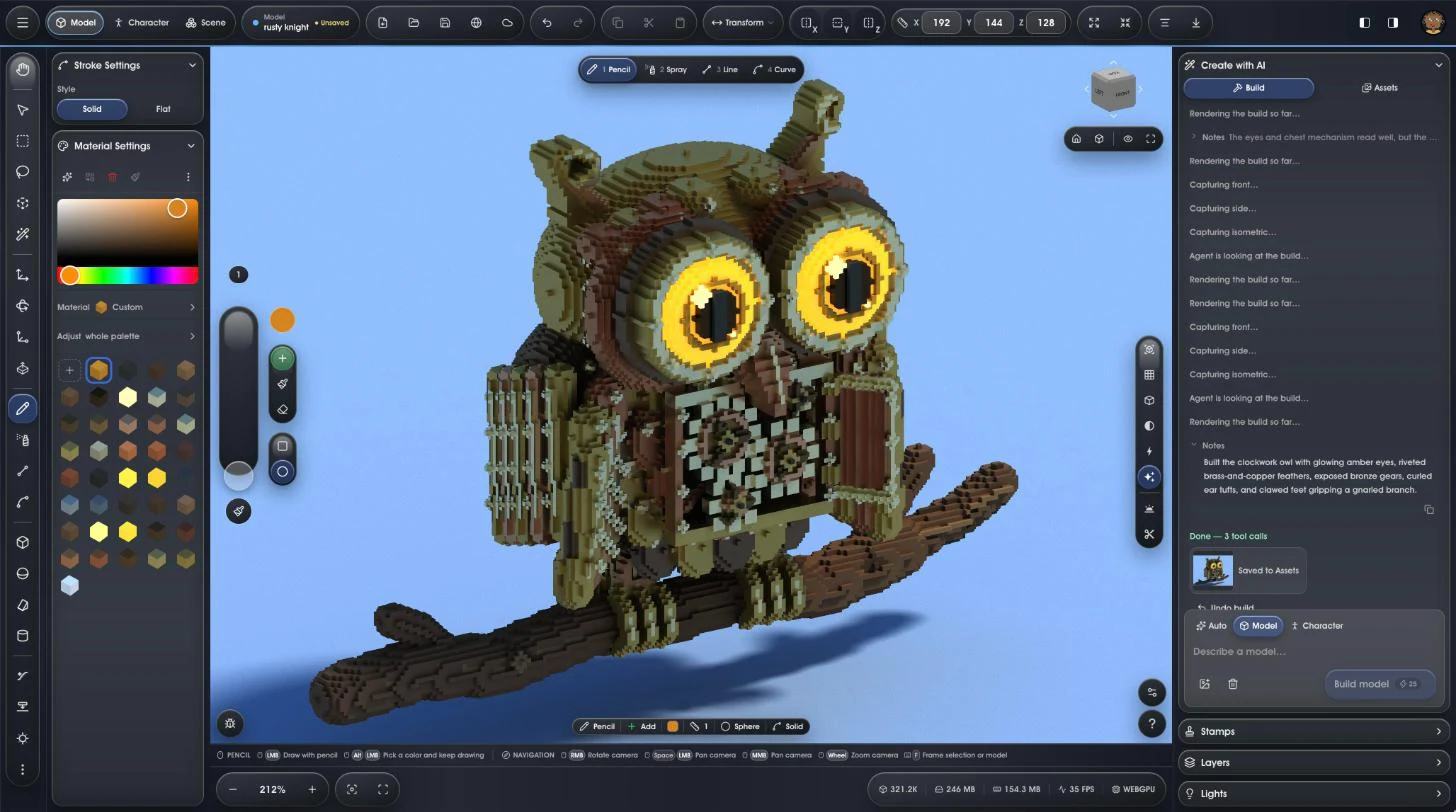
VoxiGen editor in Model mode: a brass clockwork owl with glowing amber eyes on a branch, built by Create with AI
Model to world

Sculpt once. Build whole scenes.

Create reusable voxel models, rig them into animated characters, and compose them into lit game levels without duplicating their geometry. Then export the level to your engine.

01

Create reusable models.

Sculpt, generate, import, layer, and materialize each asset in the Model context. Save it to your library and update every shared placement from one source.

02

Rig and animate it.

Stand a skeleton on any model, or let AI build a rigged character. Play its animations on the canvas, then export an animated GLB for Godot or any glTF engine.

03

Compose a real scene.

Place models freely, then move, rotate, clone, group, hide, name, and organize them in the Outliner. Ray Cast and Path Trace light the assembled world in the same viewport.

04

Save the world or ship the level.

Reopen the complete scene as a native VXS file, or export a game-ready level with one GLB per reused module and a placement manifest.

Godot importer →

VOXEN, a voxel shooter with thirteen worlds, was built entirely in VoxiGen Studio: every room, prop and creature. Explore VOXEN and download the launcher →

Everything you need

One editor. Model, compose, render, ship.

Create reusable voxel models and complete scenes, work at billion-voxel scale, generate assets with AI, tune materials, render final shots, and export to the tools already in your pipeline.

Massive scale

Work at billion-voxel scale.

Every model canvas can address 1024 × 1024 × 1024 voxels. VoxiGen streams active regions as you work, keeping detailed models and large scenes practical in the browser.

  • Build detailed voxel models at full resolution.
  • Place models up to 512 voxels per axis in composed scenes.
  • Get the full 1024³ canvas limit on the Free plan.
VoxiGen editor open on a large voxel workspace in the browser
Create with AI

Describe it. Watch it build.

Describe a model or a whole scene in Build and watch editable voxels appear on the canvas. Attach a picture to guide it, or make one in Assets.

  • Models, whole scenes from a kit of reusable pieces, and rigged characters.
  • Build refines its work until it matches your description before it hands over.
  • The result is ordinary voxels in layers: edit, recolour and reuse it like anything made by hand.
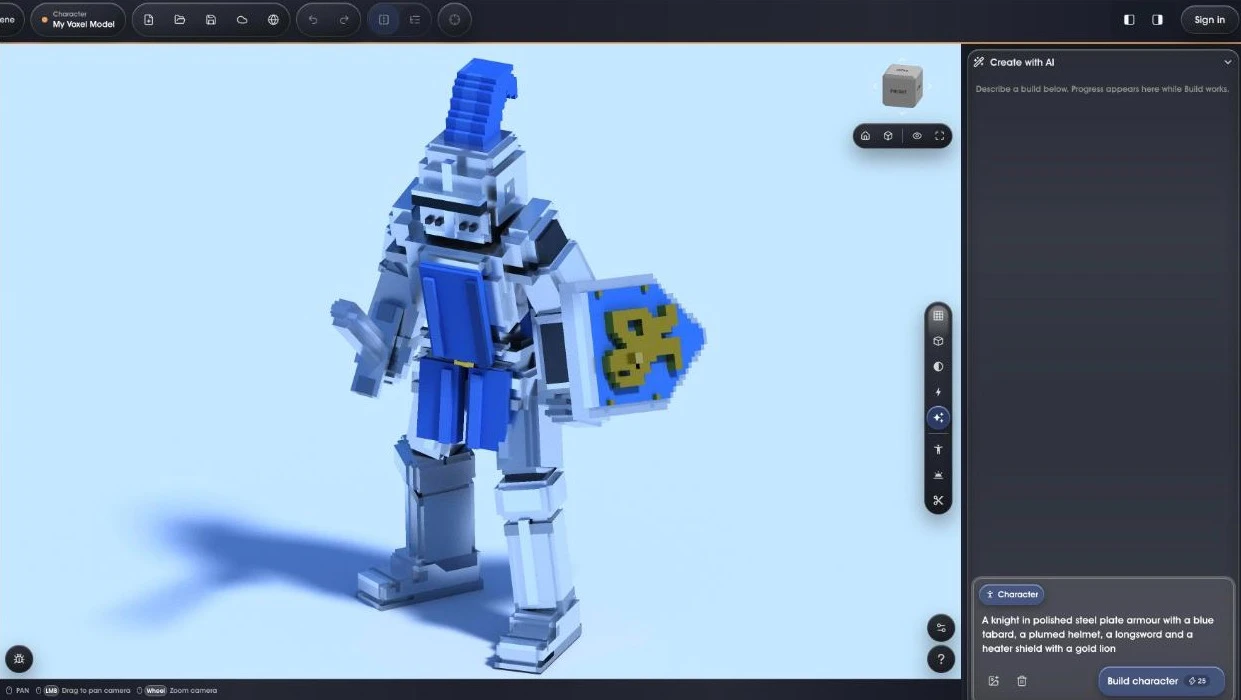
A voxel knight made by Build from a one-line description
Characters

Rigged and animated, ready for your game.

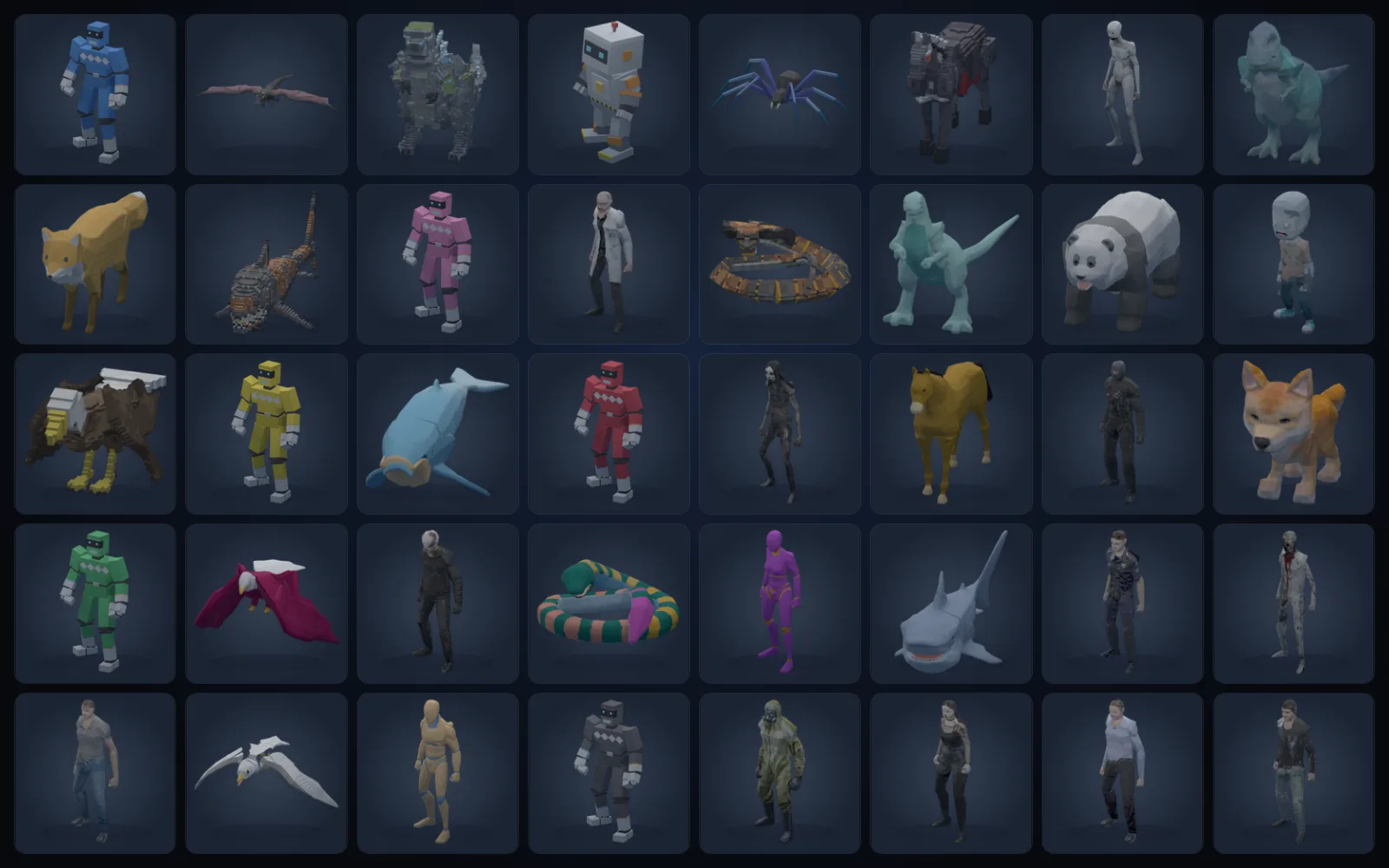
Describe a character and the AI builds it already rigged, open one of 49 ready-made characters, or put a skeleton on your own model. Play its animations on the canvas, then take it into your engine.

  • Nine skeletons: human, fox, bird, horse, dragon, snake, spider, kaiju and shark.
  • An animation library for each skeleton, around 170 clips for the human, or import your own GLB animations.
  • Export an animated GLB with every clip for Godot or any glTF engine.
A grid of rigged voxel characters: people, robots, monsters, a dragon, a T. rex, a horse, a shark and a panda
Scenes & levels

Compose whole game levels from kits.

Save pieces as stamps and kits, place them rotated, mirrored or recoloured, and compose them into complete scenes. Edit one shared model and every placement in the level follows.

  • Place, clone, group and name pieces, and organize the level in the Outliner.
  • Save the whole world as one VXS scene, or let Build lay one out from a kit.
  • Export a game-ready level: one GLB per reused piece plus a level.json placement map, ready for Godot.
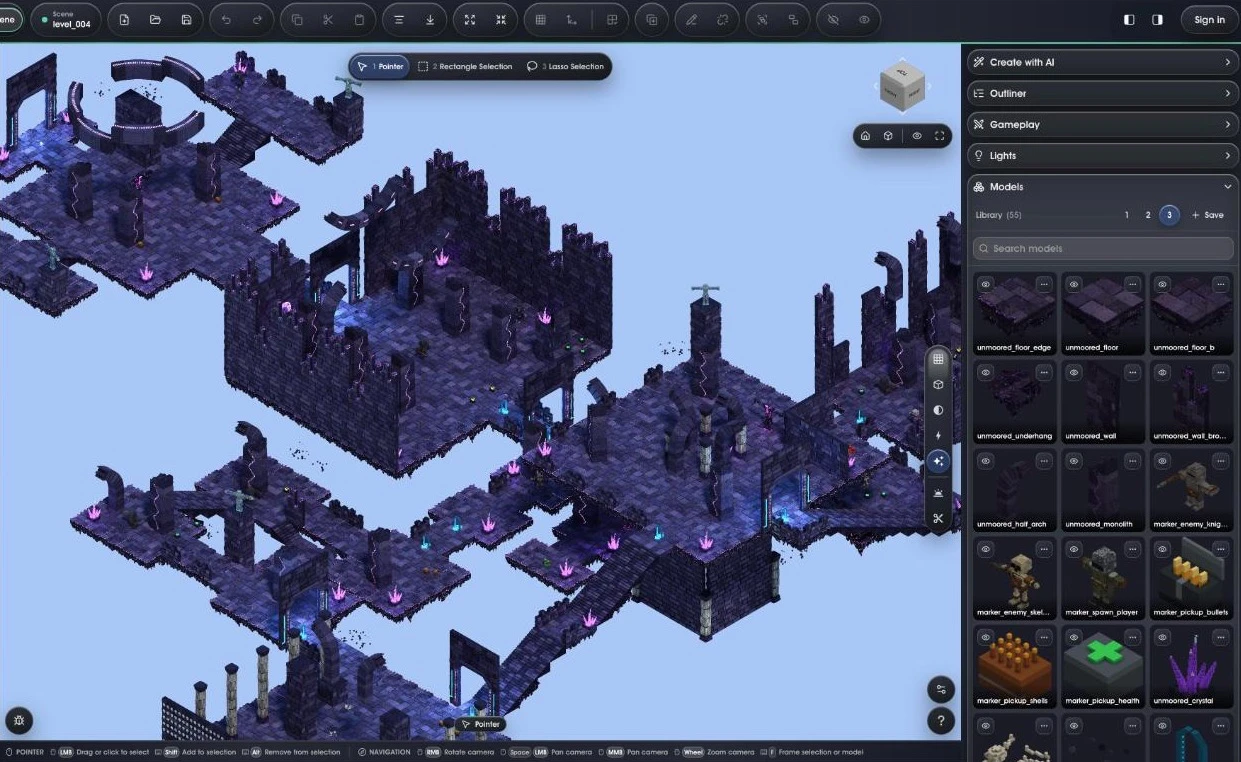
VOXEN's fourth level, The Unmoored Cathedral, open in VoxiGen's Scene mode with its kit in the Models panel: 14 rooms built from 1,889 placed kit pieces
Live final rendering

Raycast and path tracing while you edit.

Use fast raycast mode for clean live lighting, then switch to path tracing for beauty shots. The important part: the render is still the editor view, so you can adjust voxels, materials, sun and clips while seeing the final look.

  • Save screenshots and render stills directly from the viewport.
  • Raycast view gives a sharp real-time final-look preview for everyday work.
  • Path tracing converges for higher-quality shots when you want polished output.
VoxiGen render controls and post-processing view for final voxel shots
Physical materials

Materials, sun, and density are first-class controls.

Palette slots are full material slots, not just colors. Pick from matte, plastic, metal, chrome, glow, glass, frosted, cloud, and tissue presets, then tune roughness, metalness, emission, IOR, and density against a physical sun.

  • Use roughness, metalness, and emission channels for real surface response.
  • Glass, cloud, and tissue modes add transmission, volume density, and subsurface-style rendering.
  • Sun azimuth, elevation, exposure, fog, ground, and environment controls shape the scene lighting.
VoxiGen material and layer controls for voxel palette slots
Pipeline export

Export to the tools already in your workflow.

Save models as native VXB or VOX, complete worlds as self-contained VXS scenes, or export meshes and levels for game engines, printing, and web delivery, all free.

  • VXB preserves one VoxiGen model; VXS preserves the complete scene and its model library.
  • VOX keeps compatibility with common voxel editors.
  • glTF, GLB, OBJ, and STL cover web, Blender, Maya, game engines, and 3D printing workflows.

Load your levels in Godot →

VoxiGen export dialog showing compatible voxel and mesh export formats
Pricing

Free editing and export. Optional AI and Cloud.

Build and export voxel models and game levels for free. Buy prepaid credits for AI generation in VoxiGen or subscribe to Cloud for a private library and view-only share links.

Free
$0

  • Model canvases up to 1024³ with the full engine
  • Reusable model library and complete scene composition
  • Ray Cast, Path Trace, materials, layers, and editing tools
  • VXB models, VXS scenes, and VOX import/export
  • Export GLB, glTF, OBJ, STL, animated characters and game levels
  • Import OBJ, STL, GLB and glTF models and images
  • Commercial use of your own creations
Start creating

No account needed to start.

Pay as you go
AI credits
$5.00 and up

  • Build models, scenes and rigged characters from a description
  • Edit what is open with AI, priced by real use
  • Credits never expire; no subscription
500 credits
$5.00
1,100 creditsRecommended
$10.00
About 550 AI images or 44 standard 3D voxel model builds.
2,300 credits
$20.00
Buy AI credits (sign-in required)

If an AI build fails, the credits used for that build are returned to your balance.

Cloud
$4.99 / mo

  • Private cloud library across devices
  • Private view-only share links
  • Up to 100 private models
  • Or $39.99 a year
Get Cloud

Cloud includes private storage and sharing. AI credits are sold separately. Cancel anytime.

AI creation works on every plan through prepaid credits that never expire.

Creators shaping VoxiGen

Meet the artists and builders sharing models, ideas, and techniques with the community.

Questions about the voxel editor

Is VoxiGen a free voxel editor?

Yes. The editor, the full 1024³ canvas, scenes, saving as .vox or .vxb, and mesh and level export for game engines are all free, and you can use what you make commercially. Importing OBJ, STL, GLB and glTF models and images is free too. Only AI creation uses prepaid credits.

Do I need to download anything or sign up?

No. VoxiGen runs in a desktop browser with WebGPU, so there is nothing to install, and the editor needs no account. Sign in when you want to keep work in your library, publish it or use AI.

Can it open MagicaVoxel .vox files?

Yes. Open or merge .vox files and save back to .vox, so VoxiGen works alongside MagicaVoxel, Goxel and other voxel editors.

How big can a model be?

Each model canvas holds up to 1024 × 1024 × 1024 voxels, over a billion, on the free plan. Scenes place models of up to 512 voxels per axis.

Can I use my models in Godot, Unity or Blender?

Yes, for free. Export GLB, glTF, OBJ, STL or whole game levels, and Godot users get a free importer for VoxiGen levels. Importing OBJ, STL, GLB and glTF models and images is free too.

Can AI make a model for me?

Yes. Build turns a description or a reference picture into a voxel model or a rigged character that you then edit like any other. It uses prepaid AI credits.

Coming from another voxel editor?

Open a browser tab. Build a world.

No download or account is needed to look around. The engine is already running and ready for your next model, scene, or level.